| Author |
 Topic Search Topic Search  Topic Options Topic Options
|
Countryboy92 
Bronze Level


Joined: 08 Aug 2017
Location: North Carolina
Points: 32
|
 Post Options Post Options
 Thanks(0) Thanks(0)
 Quote Quote  Reply Reply
 Topic: A-C 5040 ignition switch diagram Topic: A-C 5040 ignition switch diagram
Posted: 11 Aug 2017 at 3:46pm |
|
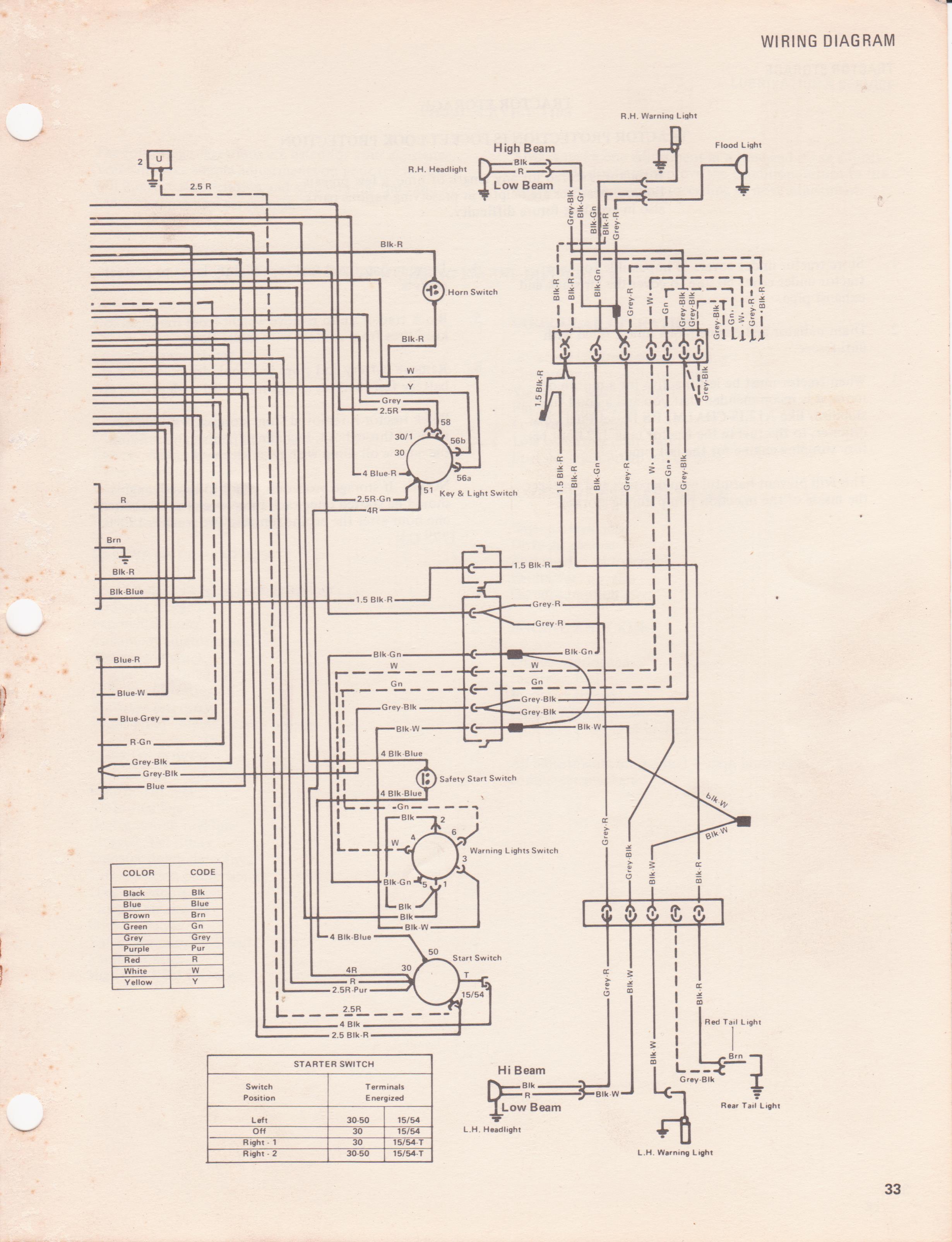
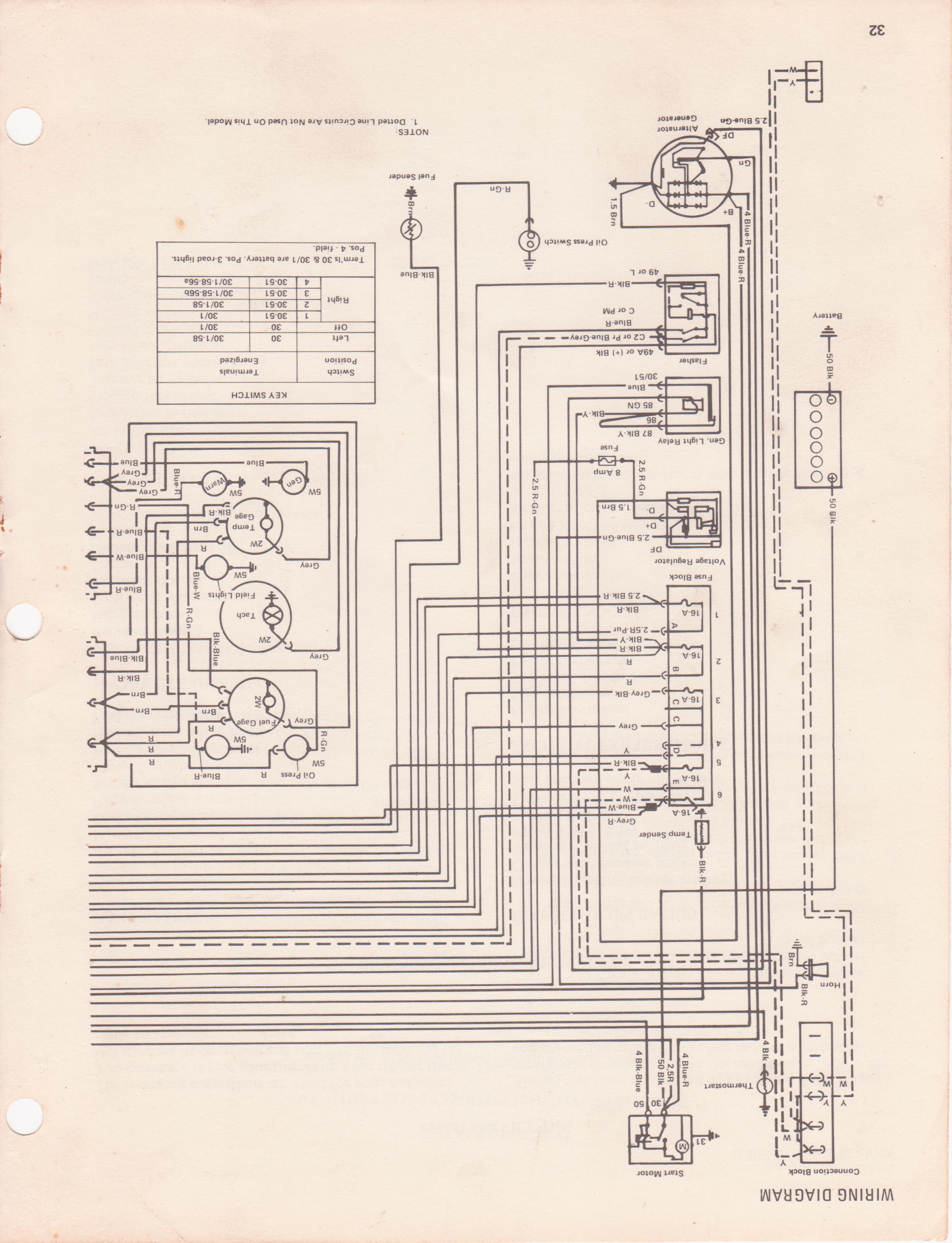
Does anyone have a diagram for how the ignition switch for a 5040 should be wired? Picked up an old 5040 that had the switch removed, ordered a new one and need to install it right. Thanks in advance.
|
 |
|
Sponsored Links
|
|
|
DougS
Orange Level


Joined: 03 Nov 2011
Location: Iowa
Points: 2490
|
Post Options
Thanks(0)
Quote Reply
Posted: 12 Aug 2017 at 6:01am |
If I were there and looking at it, I could help. If you could tell me where the individual wires go I might be able to help. All I can say for now is the wire that is hot all the time goes to the common terminal on the switch. ETA: I went over to the Allis Chalmers Parts Book and found a drawing. There are about six wires that go the switch, but the drawing is in black and white, so it is worthless as a "how to" source.
Edited by DougS - 12 Aug 2017 at 6:36am
|
|
Gatz in NE
Orange Level
Joined: 11 Sep 2009
Location: Lincoln, NE
Points: 1062
|
Post Options
Thanks(0)
Quote Reply
Posted: 12 Aug 2017 at 9:06am |
Had a 5040 at one time, but sold it and the Op & Service manuals went with it. Those manuals were very good. I think these are still available from Jensales http://www.jensales.com/categories/allis-chalmers-agco-allis/5040.htmlThis might help a little.. 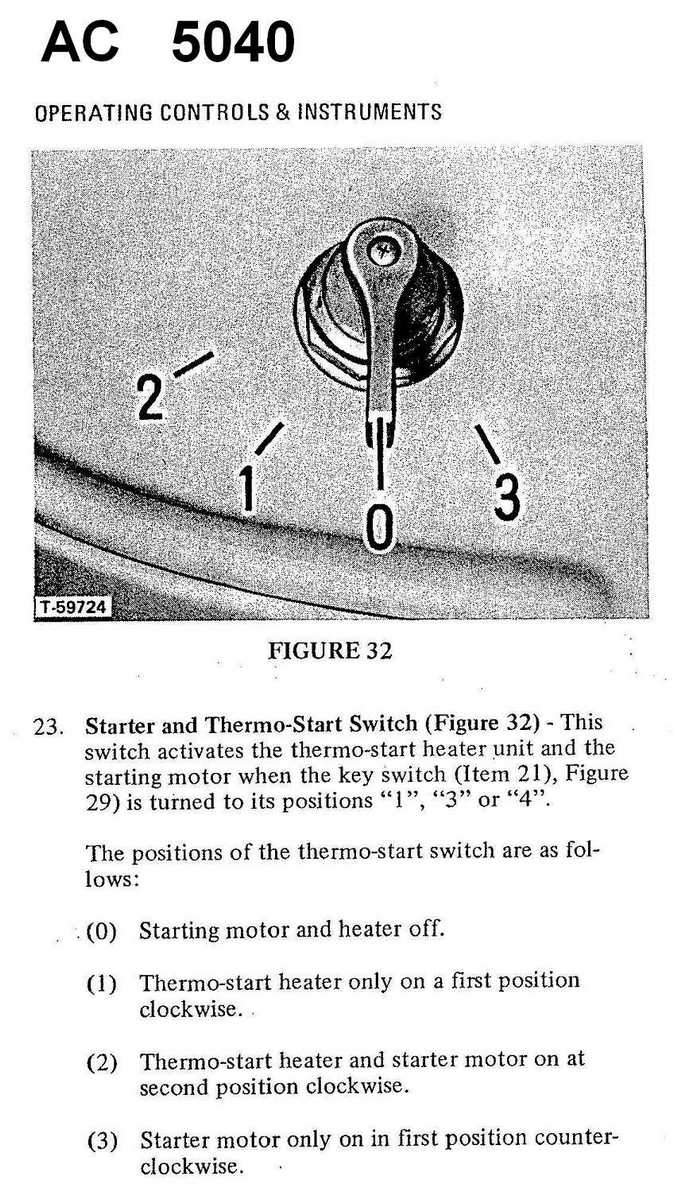
|
|
Countryboy92
Bronze Level
Joined: 08 Aug 2017
Location: North Carolina
Points: 32
|
Post Options
Thanks(0)
Quote Reply
Posted: 14 Aug 2017 at 1:38am |
|
Thank you everyone.
|
|
Sam T-Ga
Orange Level
Joined: 13 Sep 2009
Location: Monticello, Ga.
Points: 392
|
Post Options
Thanks(0)
Quote Reply
Posted: 14 Aug 2017 at 6:07pm |
|
I have operators manual with wiring diagram, now if I can figure how copy and post. I will send on another post.
|
|
Sam T-Ga
Orange Level
Joined: 13 Sep 2009
Location: Monticello, Ga.
Points: 392
|
Post Options
Thanks(0)
Quote Reply
Posted: 14 Aug 2017 at 6:38pm |
|
|
|
Sam T-Ga
Orange Level
Joined: 13 Sep 2009
Location: Monticello, Ga.
Points: 392
|
Post Options
Thanks(0)
Quote Reply
Posted: 14 Aug 2017 at 6:40pm |
|
|
|
Sam T-Ga
Orange Level
Joined: 13 Sep 2009
Location: Monticello, Ga.
Points: 392
|
Post Options
Thanks(0)
Quote Reply
Posted: 14 Aug 2017 at 6:41pm |
|
|
|
Sam T-Ga
Orange Level
Joined: 13 Sep 2009
Location: Monticello, Ga.
Points: 392
|
Post Options
Thanks(0)
Quote Reply
Posted: 14 Aug 2017 at 6:44pm |
|
Well I did get it on here. You may have to turn your computer upside down to look at the last. It was the center pages in operators manual. The key switch is also the light switch.
|
|
Sam T-Ga
Orange Level
Joined: 13 Sep 2009
Location: Monticello, Ga.
Points: 392
|
Post Options
Thanks(0)
Quote Reply
Posted: 15 Aug 2017 at 10:03am |
|
Did these help?
|
|