Darin Stratton HELP!!!!!!!
Printed From: Unofficial Allis
Category: Allis Chalmers
Forum Name: Farm Equipment
Forum Description: everything about Allis-Chalmers farm equipment
URL: https://www.allischalmers.com/forum/forum_posts.asp?TID=140493
Printed Date: 31 Dec 2025 at 5:00am
Software Version: Web Wiz Forums 11.10 - http://www.webwizforums.com
Topic: Darin Stratton HELP!!!!!!!
Posted By: Ted J
Subject: Darin Stratton HELP!!!!!!!
Date Posted: 17 Jul 2017 at 7:57am
|
THANK YOU Darin Stratton for this site!!! NOW,,,,,,,,,,,,, in regards to Photobucket...........We're being held hostage.... Let's ACT!! I've been saying this all along............ How much will each member toss into the pot to buy a second server or external hard drive so that ALL pictures can be put on THIS site and not have to be inputted from somewhere else? What's it worth guys?? Darin, can you tell us what you need so we can help pay for whatever it is and so we don't ever have to worry about this kind of crap again from someone else like Photobucket!! There is a lot of stuff in the knowledge base that we need to keep and will have to go back into and replace pictures. For those of us who have benefited from the http://www.allischalmers.com/forum/forum_topics.asp?FID=18&title=farm-equipment-knowledge-base" rel="nofollow - Farm Equipment -Knowledge Base and used it, we need to safe guard these things!!! Darin, we need help!! Please let us help! What can we do to help?? Darin, What are YOUR thoughts? ------------- "Allis-Express" 19?? WC / 1941 C / 1952 CA / 1956 WD45 / 1957 WD45 / 1958 D-17 |
Replies:
Posted By: Sandknob
Date Posted: 17 Jul 2017 at 9:55am
|
Yeah, I've noticed problems with photobucket too. What is the deal with it exactly? Adam |
Posted By: Butch(OH)
Date Posted: 17 Jul 2017 at 9:58am
|
Tinypic has worked great for me for many years. |
Posted By: Dave (NE)
Date Posted: 17 Jul 2017 at 10:28am
| Butch, what is tinypic? Dave |
Posted By: Moderator
Date Posted: 17 Jul 2017 at 10:30am
|
I have messaged Darin. ------------- ============================================================ The moderator at any given time may be the forum owner, or a trusted assistant. Your cooperation is appreciated. Thank You |
Posted By: LouSWPA
Date Posted: 17 Jul 2017 at 10:34am
|
If I'm not mistaken, we no longer need Photo Bucket to post pictures on here ------------- I am still confident of this; I will see the goodness of the Lord in the land of the living. Wait for the Lord; be strong and take heart and wait for the Lord. Ps 27 |
Posted By: LouSWPA
Date Posted: 17 Jul 2017 at 10:36am
|
test ------------- I am still confident of this; I will see the goodness of the Lord in the land of the living. Wait for the Lord; be strong and take heart and wait for the Lord. Ps 27 |
Posted By: dstratton
Date Posted: 17 Jul 2017 at 10:54am
|
I'll have to do some checking into it. I don't think space is the issue really. Images represent a lot more management responsibility than just the textual information in the forum. If I need to backup or move the forum to a different server, everything is in one database. Images on the other hand can account for thousands of files and add up to tons of bandwidth over time. I know this is a topic on other forums as well so I will check around for solutions. Currently you can upload a limited number of images directly to the forum. It works much better if you have a means of reducing the file sizes before you do though. Most cameras, even on phones, take images that are several times larger than what is needed for a post. ------------- ============================================================ Darin Stratton 3000toys.com - b2bReplicas.com - AllisChalmers.com ============================================================ |
Posted By: Butch(OH)
Date Posted: 17 Jul 2017 at 11:33am
They are a photo host site like photobucket only without all the BS. |
 Dave (NE) wrote:
Posted By: IBWD MIke
Date Posted: 17 Jul 2017 at 12:03pm
|
They just made a change like this on Red Power right before photo-bucket went off the rails. It's really easy to use, might check with them to see what they did. |
Posted By: CAL(KS)
Date Posted: 17 Jul 2017 at 12:49pm
you could always post without using photobucket. the problem is the file manager is limited space and when it becomes full you have to delete photos to post others and that removes them from any posts they are in. ------------- Me -C,U,UC,WC,WD45,190XT,TL-12,145T,HD6G,HD16,HD20 Dad- WD, D17D, D19D, RT100A, 7020, 7080,7580, 2-8550's, 2-S77, HD15 |
Posted By: Gatz in NE
Date Posted: 17 Jul 2017 at 1:17pm
|
as re photo resizing, Fast Stone image viewer works great and it's free. It's kept on your computer. Make a shortcut to it on your desktop. It allows resizing, cropping, alignment by angle, batch functions, color adjustments (which really comes in handy for dim or washed-out pix) Probably one of the handiest things it has is screen capturing. Once you decide on pic size, it will convert a whole batch of pix to that size. I try to keep my pix somewhere between 200kb to 500kb. Often times they only need to be 200 or under. Seems to work fine for uploading and emailing. And like has been mentioned, digital cameras have WAY too much pixels for ordinary usage. http://www.faststone.org/" rel="nofollow - http://www.faststone.org/ FastStone Image Viewer 6.2 ..... 1st one listed |
Posted By: darrel in ND
Date Posted: 17 Jul 2017 at 1:22pm
| My son posts pictures on here using windows paint. I don't have a clue how it works, but he doesn't use photo bucket. Darrel |
Posted By: Ted J
Date Posted: 17 Jul 2017 at 1:27pm
|
Yes Lou, you can post. The problem is that you only have room for so many pics and then you have to delete some to add more. The same thing happens, threads with no pics...... What ever it takes Darin, I'm willing to help out. Financially, time, or expertise or what ever. ------------- "Allis-Express" 19?? WC / 1941 C / 1952 CA / 1956 WD45 / 1957 WD45 / 1958 D-17 |
Posted By: tornado8070
Date Posted: 17 Jul 2017 at 1:43pm
|
I can't post pics directly from my iPhone without jumping through a bunch of hoops. I gave up it takes to much time ------------- 09’ DT205B, 08’ DT220A, 83' 8070 MFWD, 83’ 8070 85’ 8050 MFWD, 83' 8030, 82' 8010, 85’ 6080 MFWD, 84’ 6080, 79' 7020, 85' M3 RWD, 85' 920 diesel,AC C-50 forklift. |
Posted By: Dave (NE)
Date Posted: 17 Jul 2017 at 9:54pm
| Gatz, how about a step by step on how to do it! Or just stop by some time and show me how, eh? |
Posted By: nella(Pa)
Date Posted: 18 Jul 2017 at 6:04am
| It would be nice if I could just copy and paste the pictures in here, I would like to have it easier to put pictures on this site. |
Posted By: desertjoe
Date Posted: 18 Jul 2017 at 10:09am
|
I have never liked to use the offsites sites,,(photobucket and others) cause of my concern for them to be able to hold you hostage as it looks like PB is now doing, I keep all my pics, files on an external hard drive in addition to the ones here, but is kind of a PITA to have to delete some here in order to post once you reach the limit. Darrel,,,I too use Windows "Paint" to resize my pics when they go in and don't have to do it when tryin to post. I also would love to have that flexibility to store em here tho,,,be much more handy. OH,,and THANKS DSTRATTON for all you do for us tractor nuts,,,,,  |
Posted By: Gatz in NE
Date Posted: 18 Jul 2017 at 10:59am
sure thing, Dave and maybe this will benefit other users. just download the program and put a shortcut on your desktop. I even put a shortcut in the task bar; makes it handier when the screen is full of other stuff. The program itself should go in the C:/Program Files folder (This should be placed automatically. The reason is that if you want to remove it later, the software will be easy to locate when using Control Panel/Programs and Features to select it for removal.) I keep my pix in the default MS Libraries/Pictures, and made a TEMP folder within it. Anytime I download from a camera, I'll put them in the TEMP folder. BTW, most cellphone and digital cameras have a setting for the size of pic to be taken. Some, like the iphone 6 let you make this setting when you email them off. Click on the FastStone icon to start and a split window shows up. Browse to the TEMP folder (or anywhere else your pix may be) and you'll see the pix listed. If no pictures exist in a folder, the next step will be moot. There's a tool bar on the top that has various functions. Under Tools is "Batch Convert Selected Images"  Click on that; another window opens up showing the pix by name. Add what pix you'd like to resize to the panel on the right. The 1st one in the list is automatically added. You can see the size of the pix as they exist. The Preview box at the lower right shows whatever pic is current.  Click on "Advanced Options" Here's where you can set the pic size. When set, Click OK,  Then click on ► Convert. All the pix in the right-hand panel will be converted, however, you have choices for doing them all or just 1 at a time This process can't be reversed; use with care. The top toolbar also has Editing functions as mentioned previously. When all the editing is done, you can rename each pic, or leave as is. The renaming can be done in FastStone or by the Windows method. Then cut & paste them to a folder of your choice. That way, the TEMP folder doesn't get cluttered up. Note: When a pic is selected from a folder and FastStone is chosen for the program to open it, the pic shows up on a new screen with black background. Move the mouse arrow to the upper right. A wide toolbar pops up and when the mouse arrow moves over the third button from the far right, it says "Switch to Browser View" Click on that...... it will get you into the editing window. FastStone takes a little getting used to, but it's a great program for the price. |
Posted By: Pat the Plumber CIL
Date Posted: 18 Jul 2017 at 10:56pm
|
I would rather give the money to Darin than photobucket . It would be nice to be able to post photos like facebook . I know nothing about the technical aspect . I really appreciate all Darins efforts and I would be willing to contribute more . Like Ted says we need to protect the farm knowledge stuff . I am going to take plenty photos at Hutch this weekend . Cant figure out how to downsize the photos on my Samsung 6 yet , so hopefully I can figure out how to post some photos after I get back home . ------------- You only need to know 3 things to be a plumber;Crap rolls down hill,Hot is on the left and Don't bite your fingernails 1964 D-17 SIV 3 Pt.WF,1964 D-15 Ser II 3pt.WF ,1960 D-17 SI NF,1956 WD 45 WF. |
Posted By: HudCo
Date Posted: 19 Jul 2017 at 12:06am
| thats what i would rather do if i could use a check or credit card. dont know how that pay pal thing works |
Posted By: JC-WI
Date Posted: 19 Jul 2017 at 2:11am
|
"Cant figure out how to downsize the photos on my Samsung 6 yet , so
hopefully I can figure out how to post some photos after I get back home
." With my little phone, at the highest resolution, it is still only 1600x1200 pixel... and the more pixels, the clearer the picture is... and also longer to take a picture too. But if I want to see something in the photo, I can enlarge it some and still have it fairly clear. So, when I save my pictures, I weed out the bad ones and the rest I keep on an external hard drive at full size. and most relavent I keep on the computor too... Just have not figured out yet how to sort pics out so it is easy to find those I want without chasing through years of folders. Some day I might spend time sorting by object like crawlers in on folder and tractors in another and repairs in another etc... Use to put them on CD's and floppys before that but now they don't play sometimes. Wonder how long the harddrives will last..? Pictures I save in the manager file on here are anything from 640x480 to 980x640 Depending on how detailed the pics are. and I use the microsoft office picture manager since the other program became defunked. cropping is easy and resizing isn't bad but kind of time consuming. 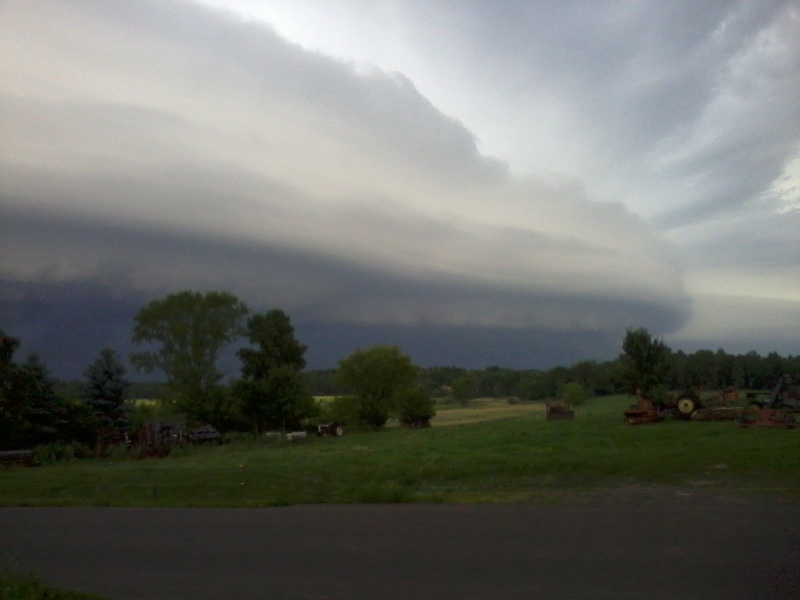 Here is an 800 x 600 photo from evening of the 17th. big enough to see the storm front. ------------- He who says there is no evil has already deceived himself The truth is the truth, sugar coated or not. Trawler II says, "Remember that." |
Posted By: Larry(OH)
Date Posted: 19 Jul 2017 at 5:22am
|
I resize pictures in paint before posting. Usualy 600x800, but sometimes smaller Use the pixel size. Works great. also if you email pictures from an iPhone, when it asks what size, use med or large NOT actual size. Actual size is really big ------------- '40 WC puller, '65 770 Ollie *ALLIS EXPRESS contact* I can explain it to you, BUT I cannot understand it for you!! |
Posted By: DougS
Date Posted: 19 Jul 2017 at 6:00am
| I don't know how this board is set up, but I suspect it is not on a personal server. Adding another drive would be impossible. I could be wrong. I don't know how much space the server permits for this board. Usually the forum site owner buys so much space on a server and pays monthy. |
Posted By: Dusty MI
Date Posted: 19 Jul 2017 at 6:03am
|
Once in a great while I post a picture on here. To size it I take it to e-mail. There I'm given a choice of small, medium, or large. I chose medium, which fits on here nicely. Dusty ------------- 917 H, '48 G, '65 D-10 series III "Allis Express" |
Posted By: jaybmiller
Date Posted: 19 Jul 2017 at 6:12am
|
yeesh JC .. I don't care how big or small you make that picture, I don't like the look of that STORM !! Sure hope all your windows were closed !! ------------- 3 D-14s,A-C forklift, B-112 Kubota BX23S lil' TOOT( The Other Orange Tractor) Never burn your bridges, unless you can walk on water |
Posted By: Kenny L.
Date Posted: 19 Jul 2017 at 10:36am
| I download all the picture that I want to post on here to my desktop then right click on picture go to edit then resize then you can resize the picture, if I can do it anyone can do it, it's that simple. Kenny L. |